

Buying guide · record your piano
Record your piano at home: Zoom H4essential, Scarlett 2i2 or Rode NT5?
Not in a studio – in your living room, on the piano you already have. Three pieces of gear that are each a real step up from your phone: a handheld recorder, an audio interface and a matched pair of microphones. For you, if you would like to hear your own playing, send it to your teacher or share it.
Ad · this guide contains affiliate links. If you buy through a link, ZOZIZA may earn a commission. Your price is the same.
Why not just use your phone?
A phone is fine for remembering an idea. But it captures the notes, not the sound. A phone microphone squeezes the sound together: the soft notes disappear, and the loud ones turn flat. And it is easy to start believing that it is your playing that sounds flat – when really it is the recording.
There is another reason, too. A piano is wide: the bass strings are on one side, the treble on the other. Two microphones give you that width back when you listen. That is why an acoustic piano is best recorded in stereo. And an honest recording matters, because what you hear afterwards is what you will change tomorrow.
Three routes to a good recording
| Route | What you need | Best for |
|---|---|---|
| Handheld recorder | The recorder on a small stand near the piano. No computer, no cables. | Pressing record and playing |
| Interface + microphone pair | An audio interface with two microphone inputs, connecting the microphones to your computer. | Stereo recording of an acoustic piano |
| Cable only | A cable from the piano's output into the interface – or a USB cable straight to the computer. | Digital piano: no microphone needed |
Where the microphone should go
Start about a metre from the piano, at chest height. Move it closer if you want more clarity – further away if you want more of the room.
Listen before you play the whole piece. Record a short passage, put your headphones on and check: is there too much bass? Too little resonance? This is where you hear it – not in the middle of the tenth take.
And play the way you normally do. Many people go stiff in the arms the moment the recorder is running. That is completely normal, and it passes once the recorder is simply allowed to sit there – even on the days when you will not use the recording for anything.
Three pieces of gear
Just press record and play: the Zoom H4essential. A handheld recorder with a built-in stereo microphone that records in 32-bit float – so you do not have to set the level before you record. It has two inputs for external microphones with phantom power, records up to four tracks, has a small built-in speaker and can guide you through the menus with a spoken voice. It runs on two ordinary batteries or over USB. The memory card and batteries are not included.
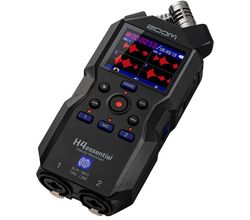
Zoom H4essential
- Built-in X/Y stereo microphone
- 32-bit float: no level setting needed
- 2 XLR/jack inputs for external mics
1.459 kr checked 25.9.2026
See price at ThomannFor your computer and for a digital piano: the Focusrite Scarlett 2i2 4th Gen. An audio interface with two microphone inputs and phantom power – exactly what a stereo pair needs. Auto Gain finds the right level for you, and Clip Safe makes it hard to record too loud. Small glowing rings around the knobs show the level. It is powered over USB, has a headphone output, and recording software comes in the box.
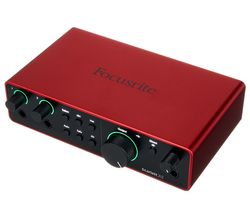
Focusrite Scarlett 2i2 4th Gen
- 2 mic inputs with +48 V phantom power
- 24-bit / 192 kHz
- Auto Gain and Clip Safe (prevents clipping)
1.422 kr checked 25.9.2026
See price at ThomannStereo, so it sounds like the room: the Rode NT5 as a matched pair. Two small-capsule condenser microphones, selected to sound the same, so the left and the right side get the same colour. Foam windshields and stand adapters are included. The microphones need phantom power – and both the Scarlett 2i2 and the H4essential provide it.
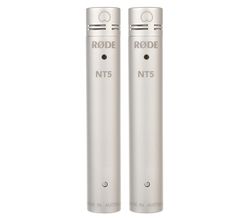
Rode NT5 MP (matchet par)
- Two matched condenser mics with 1/2" capsule
- Cardioid, 20 Hz – 20 kHz
- Widely used on acoustic pianos
2.499 kr checked 25.9.2026
See price at ThomannFeel free to start simply. If you start with the handheld recorder and want more width in six months' time, the microphone pair plugs straight into it. Nothing is wasted. See three ready-made setups on the record your piano page and more gear under recording gear.
Before you buy: three things that are easy to forget
- The stand. The microphone pair should sit on one stand, and for that you need a small stereo bar that holds both microphones. On top of that you will need a microphone stand and two microphone cables.
- The memory card for the H4essential. It is not included, so order one at the same time – otherwise you are left with a recorder that cannot record.
- Headphones. For listening back, closed headphones are good, because they do not let sound leak into the microphone – see the headphones guide.
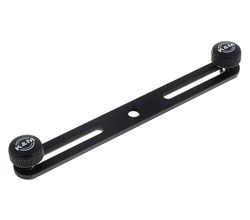
K&M 23550 stereoskinne
- Holds two microphones on one stand
- For XY and ORTF setups
88 kr checked 25.9.2026
See price at ThomannThree takes – not forty
Once you have the gear, the real challenge is not the technology but yourself. The Listening Repertoire (The Intuitive Pianist, Volume V) describes the biggest trap: recording again and again until it is faultless. After forty play-throughs you have a recording without mistakes – and usually without music too, because by the end you are playing defensively. Set a limit in advance: three attempts, and choose the most alive of them. Use the recording as a mirror, not as a verdict.
The Listening Repertoire on Kindle
Try this tomorrow
Record the same four bars twice – first with the recorder or your phone close to the piano, then a couple of metres away. Listen to both on headphones. The one that sounds most like the room shows you where the recorder should go.
Questions
Can I not just record my piano with my phone?
To remember an idea, yes. But a phone microphone squeezes the sound together, so soft notes vanish and loud ones flatten. A handheld recorder with a stereo microphone is the smallest step up.
Do I need a microphone for a digital piano?
No. Run a cable from the piano's output into the two inputs of an audio interface, or use a USB cable straight to the computer – then you record the piano's own sound.
What does 32-bit float mean on a recorder?
That you do not have to set the recording level before you record. You put the recorder in place, press record and play – the Zoom H4essential works this way.
More guides: Record your piano · Recording gear · Headphones for piano · All videos